
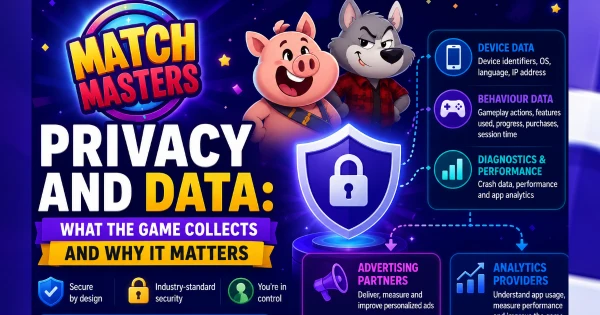
Every time you open Match Masters, data is being collected. This article covers what Candivore gathers, how they use it, what gets passed to third parties, and the steps you can take to limit it.
Most players never read a privacy policy. They are long, written in legal language, and easy to ignore.
But it is worth knowing the basics of what Match Masters collects from your phone. Not because it is alarming, but because the facts help you make an informed decision about things like advertising permissions and social account linking.
Everything here is based on Candivore’s published privacy policy, which is publicly available. The relevant parts are translated below into plain language.
Also view: Why Does Match Masters Keep Disconnecting? Fixes That Actually Work
Who Is Collecting Your Data
The company behind Match Masters is Candivore LTD, an independent mobile gaming studio founded in 2018 and based in Tel Aviv, Israel.
Candivore operates Match Masters along with the websites candivore.io and matchmasters.com. Their privacy policy covers all of these services together.
Candivore is the data controller for the information collected through the app. Third-party services like Facebook login, Google Play, and the Apple App Store have their own separate data practices that are outside Candivore’s control.
This article reflects Candivore’s policy as of June 2026. Privacy policies can change. You can read the current full version at candivore.io/privacy.
What Data Match Masters Collects
Candivore groups what they collect into several categories. Here is each one in plain terms, along with a rating of how much it matters to a typical player.
Account Information
Collected only if you register an account. This includes your name, email address, country, phone number, and profile picture if you add one.
If you sign in through Facebook, Apple, or Google, Candivore also collects your user ID and username from that platform, plus any public profile information that service permits them to access.
Examples: name · email · Facebook user ID · profile photo
Technical Device Data
Collected automatically every time you use the app. This is the broadest category and includes a lot of detail about your device.
These can include:
- IP address
- device model
- OS version
- screen resolution
- connection type
- system language
- time zone
- battery level
- available storage space
- timestamp
Advertising Identifiers
Candivore collects your Mobile Advertising ID. On iPhone this is the Apple IDFA. On Android it is the Google AAID. These are unique codes your phone generates that allow apps and ad networks to track your behaviour across different apps for advertising purposes.
You can reset or delete these identifiers in your phone’s privacy settings at any time. This is the most actionable part of data collection for most players.
Gameplay and Behaviour Data
How you play the game. Which matches you enter, how long you play, which boosters you use, your in-game decisions. This is used to improve the game, balance matchmaking, and personalise offers shown to you.
These can include:
- Match results
- session length
- booster usage
- in-game purchases
- event participation
Purchase Data
If you buy gems or bundles, billing and payment details are handled by third-party payment processors, not stored directly by Candivore. Candivore does receive a record of what was purchased and when.
These can include:
- Purchase history
- transaction timestamps
- platform used (App Store or Google Play)
Support Communications
Any message you send to Candivore through the in-app support form or by email becomes part of their records. This includes your name, email address, and the content of your messages.
These can include:
- Support ticket content
- email address
- device info you mention in tickets
Tracking Technologies
Candivore uses cookies, pixels, and local storage on their websites. Inside the app, tracking works through device identifiers rather than browser cookies.
These are used for analytics, personalisation, and advertising, both on Candivore’s own platforms and across other companies’ websites.
These can include:
- Web cookies
- pixel tags
- local storage
- device identifiers
Why It Is Collected
Candivore’s policy lists several purposes. In plain terms:
To run the game: Match results, account data, and device information are needed to make the app work. You cannot play without some data being collected.
To improve the game: Gameplay data helps Candivore balance matchmaking, fix bugs, and understand which features players actually use.
To personalise what you see: Your behaviour influences which offers, boosters, and events appear in your game.
For advertising: Your advertising identifier can be used to show you targeted ads both inside and outside the game. This is the commercial reason behind collecting the IDFA and AAID.
To process purchases: Transaction records are needed to deliver what you paid for and handle any disputes.
Legal compliance: Some data is retained because Candivore is required to keep it under applicable law.
What Gets Shared With Third Parties
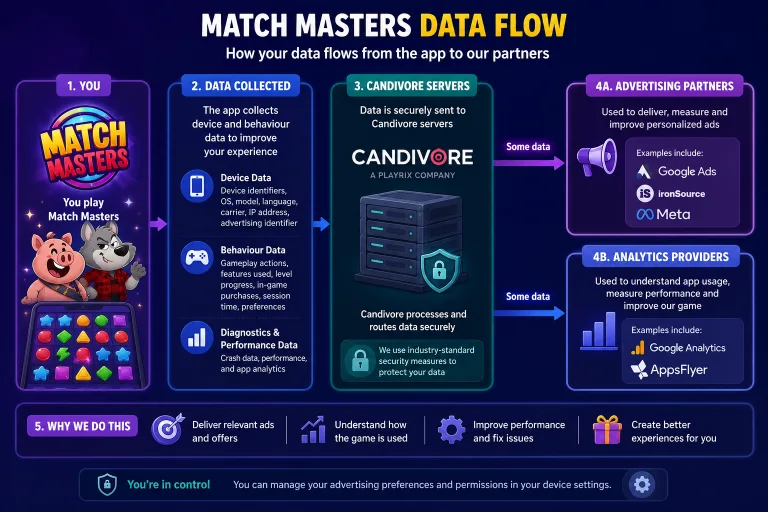
Your data does not stay only with Candivore. Parts of it reach advertising networks and analytics services.
This is the part most players would find most relevant to their day-to-day use of the app.
Candivore’s policy states that data may be shared with advertising partners, analytics providers, and other third-party services they use to operate the game. Your advertising identifier can be used to show you targeted ads through external ad networks.
Both the Apple App Store and Google Play disclosures for Match Masters confirm that the app may share certain data types with third parties. The categories listed include identifiers, usage data, and diagnostics.
Candivore states they do not knowingly collect or share sensitive personal data. They also state they do not sell personal data in the traditional sense. However, sharing data with ad networks for targeted advertising is a commercial arrangement that functions similarly from the user’s perspective.
Third-party platforms have their own rules. If you log in with Facebook, Apple, or Google, those companies also collect data through that connection under their own terms. Candivore does not control what those platforms do with information you share when linking your account.
Your Rights Over Your Data
What you can request from Candivore depends on where you live. GDPR applies to players in the EU and UK. CCPA applies to California residents. Players elsewhere may have fewer formal rights.
| Right | EU and UK (GDPR) | California (CCPA) | Other regions |
|---|---|---|---|
| See what data is held about you | Yes | Yes | May vary |
| Request deletion of your data | Yes | Yes | May vary |
| Opt out of data being sold | Yes | Yes | Not guaranteed |
| Correct inaccurate data | Yes | Limited | May vary |
| Withdraw consent | Yes | Yes | May vary |
To exercise any of these rights, contact Candivore through the in-app support form. Include your account details and state clearly what you are requesting. Our guide on how to contact Match Masters support covers exactly how to do this.
How to Limit What Gets Collected
You cannot stop all data collection and still play the game. Some data is required for the app to function. But you can limit advertising tracking specifically, which is what most players care about most.
On iPhone: turn off ad tracking
You can do this by following these simple steps:
- Open Settings on your iPhone.
- Go to Privacy and Security, then tap Tracking.
- Turn off Allow Apps to Request to Track.This prevents Match Masters and other apps from asking permission to follow your activity across apps and websites.
- You can also go to Settings, Privacy, Apple Advertising and turn off Personalised Ads.
On Android: delete your advertising ID
- Open Settings on your Android phone.
- Go to Privacy, then tap Ads.On some Android versions this is under Google, then Ads.
- Tap Delete advertising ID.This removes the identifier entirely. Apps then have no ID to use for targeted ads.
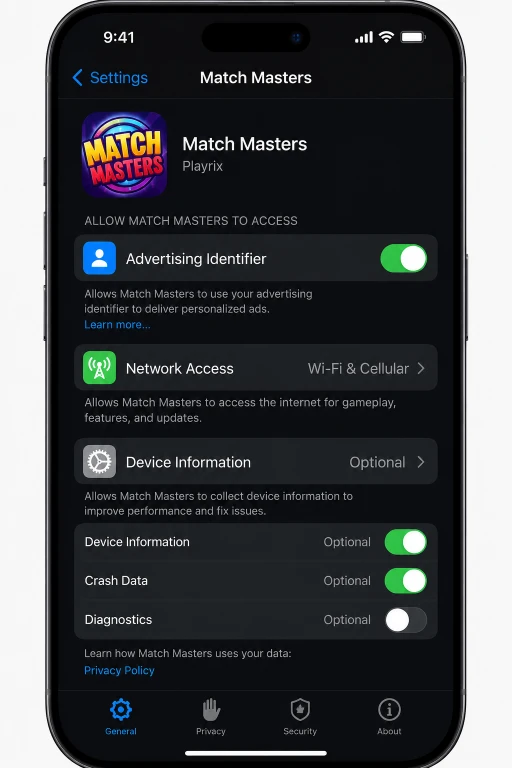
Review app permissions
You can also check exactly what permissions Match Masters holds on your device.
On iPhone: go to Settings, then scroll down to Match Masters in the app list. On Android: go to Settings, then Apps, then Match Masters, then Permissions.
Most permissions are needed for the app to function, but seeing the full list takes 30 seconds and tells you exactly what the app has access to.
If you want to request deletion of your data or have a specific question about your account, see our guide on how to contact Match Masters support for the exact steps to reach Candivore.
conclusion
Match Masters collects account data, detailed device information, advertising identifiers, gameplay behaviour, and support messages. Some of this is passed to advertising and analytics third parties.
The data collection is broadly in line with other mobile games of this scale. The advertising ID tracking is the most significant thing you can personally control, and limiting it takes about 30 seconds in your phone’s privacy settings.
If you are in the EU, UK, or California, you have formal legal rights to see, correct, or delete your data. Contact Candivore support to exercise them. The full policy is at candivore.io/privacy.
Looking for the free daily gifts?
Coins, boosters, and stickers from Candivore’s official channels. Updated every day. See Today’s Free Gifts
Frequently Asked Questions
What data does Match Masters collect?
Match Masters collects account data if you register (name, email, country, profile picture), technical device data (IP address, device model, OS version, screen resolution, battery level, storage space, time zone), advertising identifiers (Apple IDFA or Google AAID), gameplay behaviour, purchase history, and any information you send through support. Payment details are processed by third parties, not stored directly by Candivore.
Does Match Masters share my data with third parties?
Yes. Candivore’s privacy policy states data may be shared with advertising partners, analytics providers, and payment processors. Your advertising ID may be used to serve targeted ads inside and outside the game. You can limit this through your phone’s privacy settings using the steps in this article.
Can I play Match Masters without linking a social account?
Yes. Linking Facebook, Apple, or Google is optional. However, without a linked account you cannot recover your progress if you lose access to your device. The app still collects technical device data whether or not you link a social account.
Does Match Masters collect data from children?
Candivore’s policy states they do not knowingly collect personal data from children under 13. Their Terms of Service require parental consent for minors to use the services. If you believe your child’s data was collected without consent, contact Candivore support through the in-app form
How do I limit what data Match Masters collects?
On iPhone, go to Settings, Privacy and Security, Tracking, and turn off Allow Apps to Request to Track. On Android, go to Settings, Privacy, Ads, and tap Delete advertising ID. You can also check the full list of permissions Match Masters holds under Settings, Apps, Match Masters, Permissions on either platform.
How do I request deletion of my Match Masters data?
Contact Candivore through the in-app support form at Menu, Support, Contact Support. State clearly that you want your personal data deleted and include your account details. Players in the EU, UK, and California have a formal legal right to this request under GDPR or CCPA.







1 thought on “Match Masters Privacy and Data: What the Game Collects and Why It Matters”